Automate the Repetitive Work So You Can Focus on Growth
Stop doing the same tasks over and over. Our visual workflow builder lets you automate follow-ups, reminders, campaigns, and pipeline actions across every channel — without writing a single line of code.
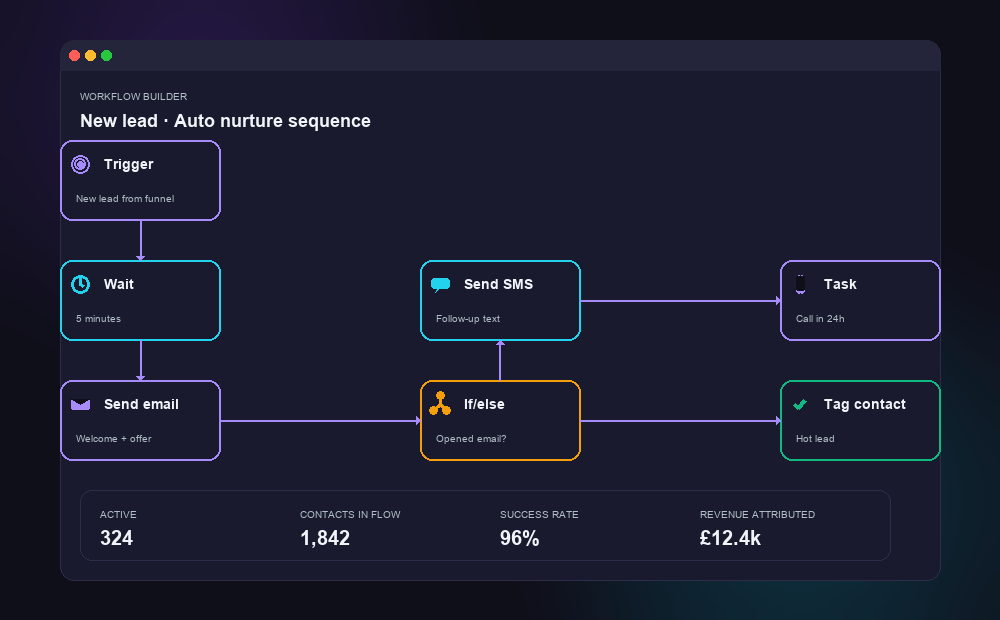
See what real automation workflows look like
Three concrete examples — lead follow-up, invoice chasing, review requests — wired together in one system.
The 14 follow-ups that didn't happen this week
Every service business has a long tail of work that should happen but doesn’t. The thank-you email after a job. The review request three days later. The check-in a month after that. The seasonal reminder. The win-back text for the client who hasn’t booked in 6 months. The follow-up to the quote that went out 10 days ago.
None of it is hard. All of it is high-value. And almost none of it gets done consistently — because doing it manually means someone has to remember, and remembering is the most fragile part of any business.
The result is leaked revenue. Industry studies put the value of consistent follow-up at 25–40% of total revenue for service businesses, and yet most teams admit they manage maybe a third of what they should. That gap — between what should happen and what actually happens — is the gap workflow automations close.
Workflows that do the boring, repeatable work for you
We build visual, drag-and-drop workflows that react to anything your customers do (or don't do). Form filled? Trigger a welcome sequence. Job marked complete? Schedule a review request three days later. Quote not accepted in 7 days? Send a soft nudge. Contact gone quiet for 60 days? Drop them into a re-engagement campaign.
Each workflow can fire any combination of emails, SMS, WhatsApp messages, internal team notifications, calendar bookings, tags, pipeline movements, task assignments, payment requests, or external API calls. Branch logic lets the workflow take different paths depending on what the contact does — replied, clicked, booked, ignored.
Crucially, you don’t need to be a developer. We build the workflow with you in plain English, then you can clone it, tweak it, and stack new variations whenever a new pattern emerges in your business.
Everything you need to put your business on autopilot
Each workflow is custom-built for your business. Here's what's possible.
Visual Workflow Builder
Design powerful automations with a simple drag-and-drop canvas. Add if/then logic, time delays, and branching paths — all without touching code. See your entire workflow at a glance.
Lead Nurture Sequences
Automatically follow up with new leads via email and SMS based on their behaviour. Whether they visited a page, filled in a form, or went quiet — the right message lands at the right time.
Appointment Reminders
Reduce no-shows by up to 80% with automated reminders via SMS, email, and WhatsApp. Send confirmations when they book, a reminder the day before, and a nudge an hour before their slot.
Database Reactivation
Got old leads or lapsed customers sitting in your database? Automated reactivation campaigns re-engage them with targeted messages — turning forgotten contacts into fresh revenue.
Birthday & Seasonal Campaigns
Send personalised messages on birthdays, anniversaries, and key dates throughout the year. Build loyalty and stay top-of-mind without lifting a finger — every message goes out automatically.
Pipeline Triggers
When a deal changes stage, the system springs into action: assign tasks to your team, send alerts, move contacts, or fire off follow-up messages. Your pipeline works for you, not the other way round.
Multi-Channel Workflows
Combine email, SMS, WhatsApp, voicemail drops, and phone calls into a single, coordinated workflow. Reach people on the channel they prefer — all managed from one place.
Webhook & API Integrations
Connect to over 5,000 apps via Zapier, Make, or direct API. Push data between your tools automatically — from accounting software to booking systems to spreadsheets and beyond.
How We Set It Up
We handle the technical side. You tell us what you want to automate, and we build it.
Discovery Call
We hop on a 30-minute call to understand your business, your current processes, and where you're losing time. No jargon, no pressure — just an honest chat about what's slowing you down.
Workflow Design
We map out your automations visually, showing you exactly what will happen at each step. You approve the plan before we build anything — no surprises.
Build & Test
Our team builds your workflows, connects your tools, and tests everything thoroughly. We run real scenarios to make sure every message, trigger, and action fires correctly.
Launch & Optimise
We go live, monitor the results, and fine-tune your workflows based on real data. You get a simple dashboard to see what's happening — and ongoing support whenever you need it.
What this looks like for your industry
Real-world patterns we've built for UK service businesses. Yours will look similar — tuned to your operation.
Plumbers, sweeps, electricians
Job complete → thank-you SMS the same day → review request 3 days later → seasonal service reminder 11 months later. Quote sent → nudge after 4 days if not accepted → second nudge after 10.
Chiros, dentists, salons
New patient booked → new-patient form sent → appointment reminders → post-visit care instructions → rebook nudge 4 weeks later if no future appointment booked. No-show → immediate rebook offer.
Accountants, consultants, agencies
Proposal sent → auto follow-ups → pipeline stage updates based on contact behaviour. Year-end tax client → document-request automation 6 weeks before deadline.
Coaches, course creators, agencies
Free-content download → multi-step nurture → webinar invite → sales call booking → pipeline routing. Course-purchase → onboarding sequence → check-ins at week 1, 4, and 12.
Things people ask before signing up
Do I need technical skills to use this?
No. Workflows are built visually — you drag triggers, conditions, and actions onto a canvas and connect them. We build the first set with you, walk you through it live, and you can clone and tweak from there.
What can a workflow actually trigger on?
Almost anything: form submission, calendar booking, payment, missed call, opportunity stage change, tag added/removed, email opened/clicked, SMS reply received, appointment no-show, date-based events (e.g. anniversaries), inactivity timeouts, and webhook events from external apps.
Can workflows talk to my existing tools?
Yes. Native integrations with the most common stacks (Stripe, QuickBooks, Xero, Google Workspace, Mailchimp, Zapier, n8n, Make), plus webhook in/out for anything bespoke. If it has an API, we can talk to it.
How do you stop them spamming customers?
Multiple safeguards: quiet hours so messages don't fire at 2am, frequency caps so contacts can't be hit by overlapping workflows, unsubscribe handling, DND respect, and full audit trails per contact so you can see every message they've had from you.
Can a workflow update my CRM pipeline automatically?
Yes — that's one of the most useful things they do. Quote sent → move to "Quote Out" stage. Booking confirmed → move to "Booked". Payment received → move to "Won". The pipeline reflects reality without anyone manually dragging cards.
What if I want to A/B test sequences?
Built in. Split-test subject lines, send times, message variants, or whole sequence branches. The platform reports on which variant converts better, and you can let the winner take over automatically.
Pairs well with
Most clients run this alongside one or more of these.
Ready to stop doing everything manually?
Book a free 30-minute strategy call. We'll look at your current processes, identify the biggest time-wasters, and show you exactly how automation can give you those hours back.
Book Your Free Strategy Call →Free call · No obligation · Based in East Sussex, serving UK businesses